
Philips Specialist · Ambilight Expert
Philips The One
Installation
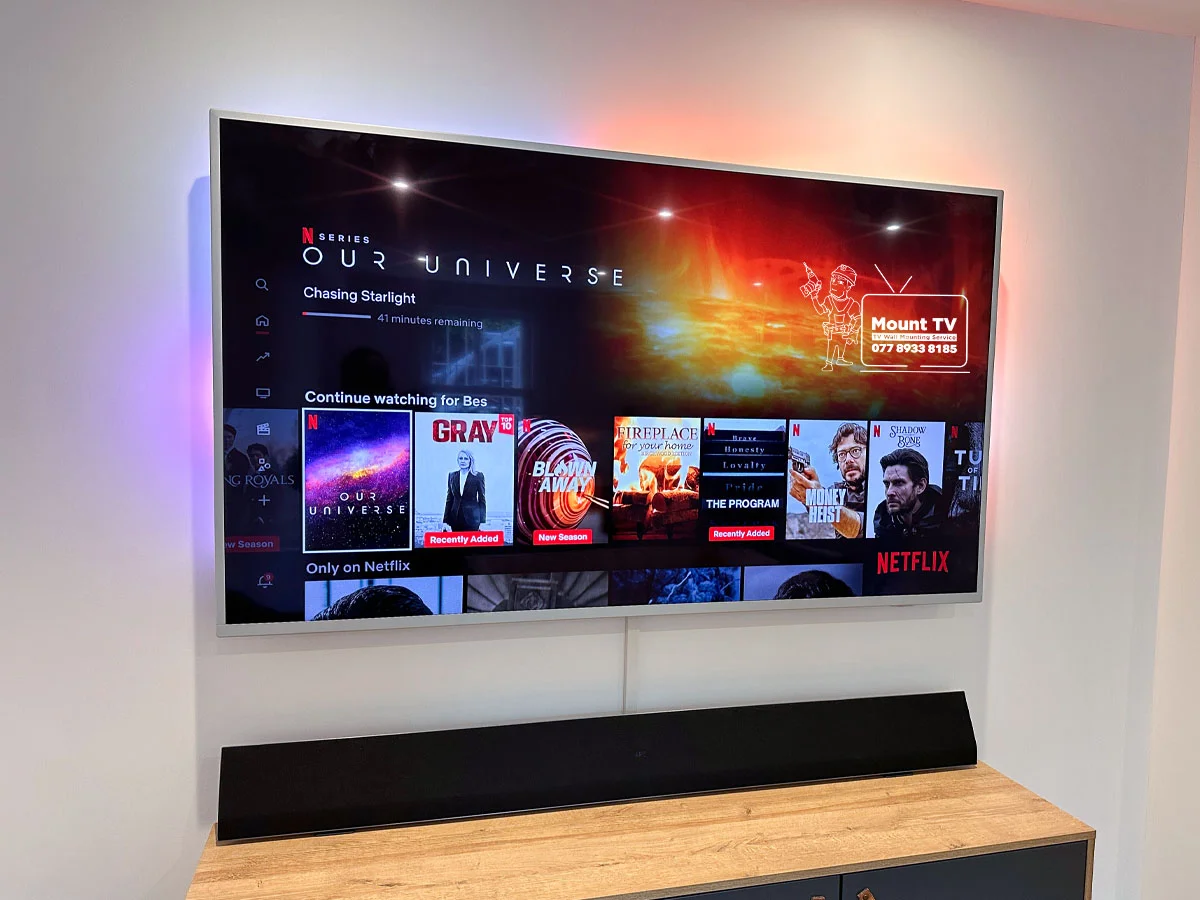
The One is Philips' popular mid-range TV with 3-sided Ambilight. Ambilight only works if the TV has the right clearance from the wall. We use a bracket with the correct 5–8cm standoff (per Philips's published guidance), route cables without blocking the LEDs, and set up your Ambilight mode so the effect works exactly as Philips designed it. Part of our full TV installation and mounting service.
We have installed Philips The One TVs across London and the South East — including PUS8908, PUS7608, and all The One variants. We know what clearance is needed before we arrive.
About This TV
What Makes the Philips The One Different
The One is Philips' budget entry to 3-sided Ambilight. That Ambilight system changes how the TV must be installed — and most fitters do not know this until the effect stops working.
Why People Buy It
Ambilight at an Accessible Price
The Philips The One (PUS8908/PUS7608) is a competitively priced way to get 3-sided Ambilight. The LEDs on the back edges of the TV project colour onto the wall behind it — extending the image beyond the screen. In a dark room, this reduces eye strain and makes the picture feel significantly larger. You get the same Ambilight technology as the flagship OLED+ range, on a mid-range LED panel with Google TV or Titan OS.
The Critical Installation Requirement
5–8cm Clearance Behind the TV
Philips specifies a minimum of 5–8cm clearance between the back of the TV and the wall for Ambilight to project correctly. A standard flat bracket sits the TV 20–30mm from the wall — not enough. The LEDs reflect off the wall at the wrong angle, and the effect appears broken or invisible. Standard flush mounting kills the Ambilight effect. This is the single most common reason The One TVs are wrongly installed.
Sizes & Weight
43" to 85" — All Sizes Covered
43"
~9 kg
50"
~12 kg
55"
~15 kg
65"
~20 kg
75"
~28 kg
85"
~36 kg
Weight affects wall fixings. The 5–8cm Ambilight clearance requirement is the same across a wide TV-size range.
The Installation Difference
Why Most Fitters Get This Wrong
General TV fitters use whichever flat bracket they have in the van. For a Philips The One, this typically leads to a poor result — the TV ends up mounted flush to the wall, the Ambilight LEDs get blocked, and the customer only discovers the problem when they turn Ambilight on that evening. We check the clearance requirement before we arrive and choose the bracket that fits the agreed setup.
Ambilight is the reason people choose The One over other mid-range TVs. A wrong installation kills the effect entirely.
What We Do
The Full Philips The One Installation
Everything from Ambilight clearance to mode configuration — as part of our professional TV mounting service.
Correct Ambilight Clearance
The single most important factor in any Philips The One installation. We use a bracket with the right standoff depth — 60–80mm from the wall — so the 3-sided Ambilight LEDs have room to project correctly. A standard flat bracket kills the Ambilight effect entirely. We never use one on an Ambilight TV.
Bracket Supply & Fitting
The One uses a standard VESA pattern (200x200 or 300x300 depending on size), but the bracket must provide the correct Ambilight clearance. If you’d like a bracket, we’ll add the right one to your quote and bring it on the day; if you’d rather supply your own, we’ll fit it; we also carry brackets in the van as part of the service — confirmed for your exact model before the day.
Ambilight-Friendly Cable Routing
Cables must be routed without disrupting the Ambilight light path. We plan cable management before mounting — routing cables through the clearance gap and down to trunking or through the wall — so they are hidden but do not block the Ambilight LEDs.
Ambilight & Picture Setup
Once mounted, we connect all inputs, pair your remote, connect to Wi-Fi, and configure Ambilight settings — brightness, sync mode (video, audio, or static), and colour bias. We verify the Ambilight projection looks correct in the room before we leave.
Size Guide
Philips The One — All Sizes Covered
A wide TV-size range require a minimum 5–8cm wall clearance for Ambilight. We bring the correct bracket for your model on the day.
Common Questions
Philips The One FAQ
What does Ambilight need for wall mounting on a Philips The One?
Ambilight projects coloured light from LEDs on the back edges of the TV onto the wall behind it. For this to work correctly, the TV needs 5–8cm of clearance between the back panel and the wall surface. A standard flat bracket positions the TV just 20–30mm from the wall — far too close. The LEDs get blocked or reflect at the wrong angle, producing a patchy or invisible Ambilight effect. We use a bracket with the correct standoff depth so the 3-sided Ambilight works exactly as Philips designed it.
How much clearance does a Philips The One need from the wall?
Philips recommends a minimum of 5–8cm (50–80mm) between the back of the TV and the wall. This is non-negotiable for Ambilight to project correctly. We use a tilt or fixed bracket with a controlled standoff depth of 60–80mm — close enough to look clean, far enough for the Ambilight LEDs to project. We confirm the exact bracket specification for your model before installation day.
What bracket do you use for a Philips The One?
We use a low-profile tilt or fixed bracket with a controlled standoff depth of 60–80mm from the wall. This keeps the TV neat on the wall while maintaining the minimum clearance the 3-sided Ambilight requires. The One uses a standard 200x200 or 300x300 VESA pattern depending on the size — we confirm the exact bracket before the installation day and supply it as part of the service.
Is Ambilight worth it on a budget TV like The One?
Yes. Ambilight is the main reason people choose Philips over other mid-range brands. The One gives you 3-sided Ambilight at a fraction of the cost of the OLED+ range. In a dark or dim room, the projected light reduces eye strain and makes the picture feel significantly larger. The effect is the same technology as the flagship models — just on an LED panel rather than OLED. If it is installed with the correct wall clearance, the Ambilight experience is excellent.
How do you hide cables with the Ambilight gap behind the TV?
Because the TV sits 5–8cm from the wall for Ambilight clearance, cables are visible in that gap if not managed. We route cables neatly through the clearance space — either via surface trunking below the TV or through the wall — so they do not block the Ambilight LEDs or hang visibly. The result is tidy cables and full Ambilight performance.
Also Consider
Complete Your Philips Setup
Cable Hiding Service
Route cables behind the plasterboard wall or through trunking — keeping them clear of the Ambilight LEDs for a clean look and full Ambilight performance.
Soundbar Installation
Wall-mount your soundbar below the Philips for a complete home cinema setup without cluttering the room.
Ready to Install Your
Philips The One?
Get a free estimate in 60 seconds. We cover London and the South East, 7 days a week.
7 days a week · Ambilight Specialist · Fully insured